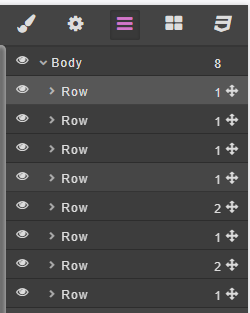
The Layer Manager displays the structure and hierarchy of all elements on your page. It helps you organize, select, and manage components within the layout.
Inside the Layer Manager, you can:
-
View element hierarchy – See how each element (such as Body, Row, Column, or Block) is nested within others.
-
Toggle visibility – Use the eye icon to show or hide elements.
-
Reorder elements – Drag and drop to rearrange elements within the layout.
-
Rename or group layers – Keep your workspace organized by labeling or grouping related components.
This section is especially useful for managing complex layouts and ensuring that your page structure remains clean and easy to navigate.
Here’s the step-by-step tutorial on how to create a simple custom page: